📦 Pakowanie produktów z appką to mniej błędów i szybsza praca Twojego zespołu





Opis szczegółowy
PrestaShop + InPost Von Halsky
Nowy kanał sprzedaży.
Mniej pracy przy obsłudze.
Sprzedawaj produkty ze swojego sklepu na InPost Von Halsky. Moduł integracji z PrestaShop wystawia oferty, synchronizuje ceny i stany magazynowe oraz importuje zamówienia. Ty rozwijasz sprzedaż. Moduł zajmuje się powtarzalną pracą.
- Wystawiaj hurtowoWykorzystaj katalog, który już masz.
- Odzyskaj czasZautomatyzuj aktualizacje ofert.
- Pracuj w PrestaShopObsługuj zamówienia w znanym panelu.
01 / Oferty
Twój katalog
Gotowy na InPost
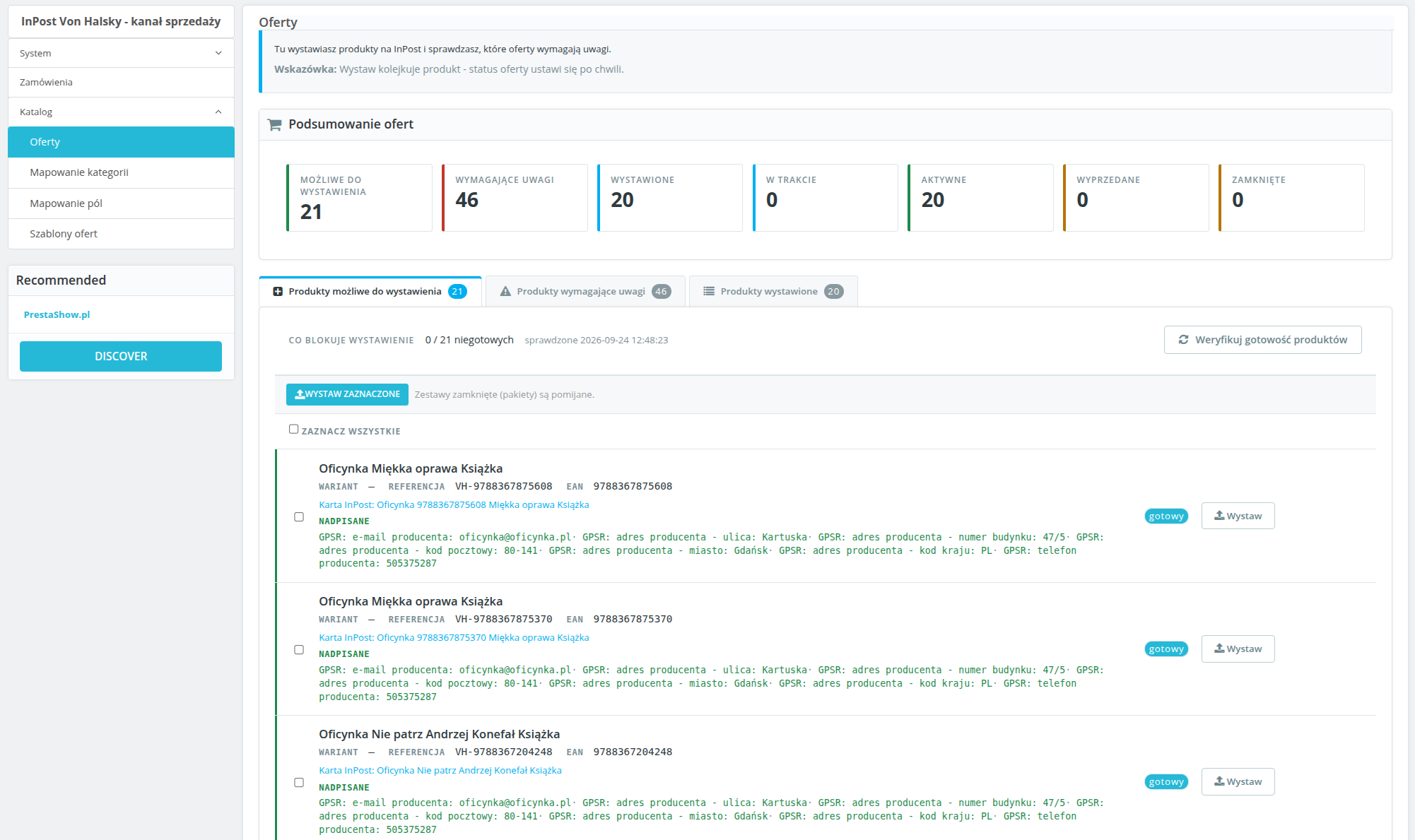
Brak EAN-u, zdjęcia, opisu lub przypisanej kategorii? Od razu wiesz, co wymaga poprawy. Filtrujesz problemy, uzupełniasz dane i wystawiasz produkty pojedynczo lub zbiorczo.
Każdy wariant może mieć osobną ofertę z własną ceną i stanem. Poprawki wprowadzone na ekranie gotowości dotyczą oferty — nie zmieniają katalogu sklepu.
02 / Szablony ofert
Twoje ceny
Twoje zasady
Ustal narzut lub rabat — procentowo albo kwotowo. Możesz też korzystać z cen wybranej grupy klientów.
Zbuduj tytuły ze zmiennych, wybierz źródło opisu i czas wysyłki. Przypisz szablon do kategorii, zamiast ustawiać każdą ofertę od początku.
03 / Synchronizacja cen i stanów
Zmieniasz w sklepie.
Moduł aktualizuje oferty.
Ustaw niezależną częstotliwość synchronizacji cen i stanów. Zmiany ze sklepu trafiają na platformę automatycznie. Postęp zadań sprawdzisz w kolejce.
Ustaw minimalny stan magazynowy. Gdy zapas spadnie poniżej progu, moduł zamknie ofertę. Ograniczasz ryzyko sprzedaży brakującego towaru.
04 / Zamówienia
Zamówienia z InPost
Obsługa w PrestaShop
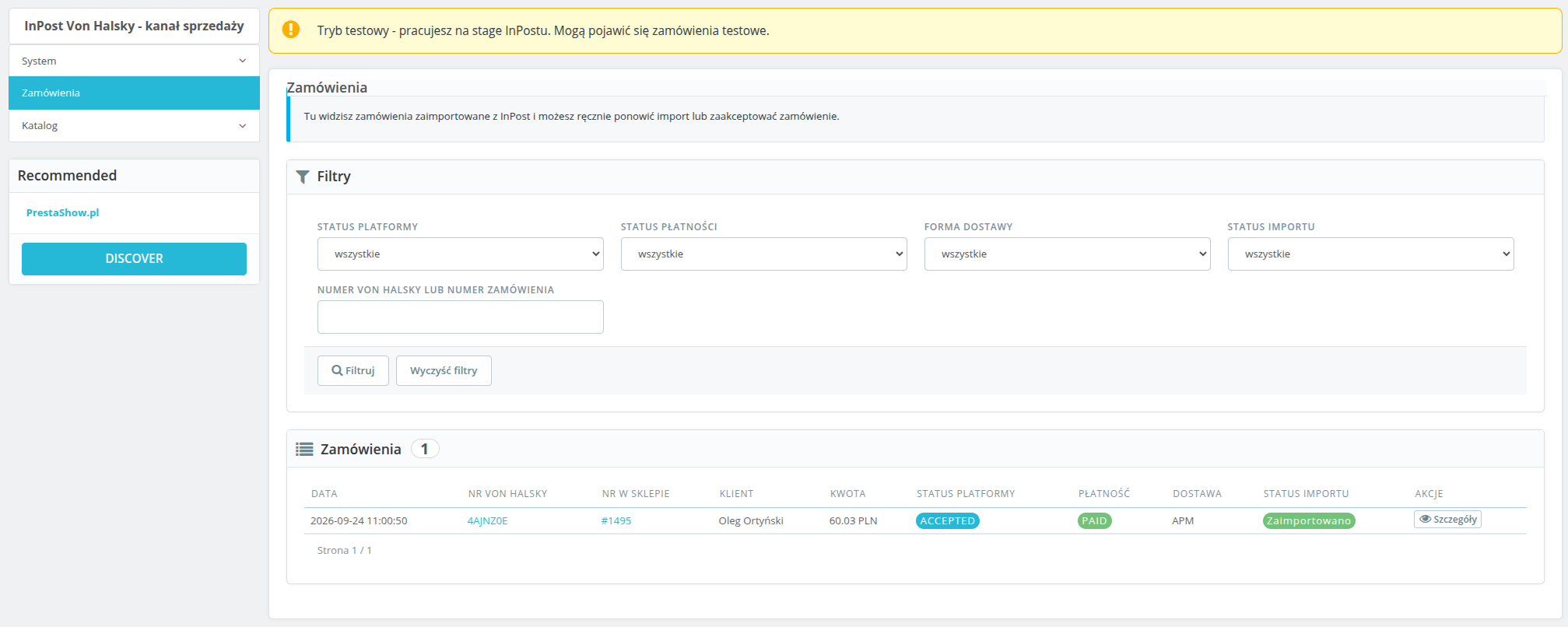
Bez ręcznego przepisywania. Opłacone i zaakceptowane zamówienia trafiają do sklepu z przypisanym statusem i przewoźnikiem — osobno dla dostawy do automatu Paczkomat i kurierem.
Numer zamówienia InPost, status i formę dostawy znajdziesz w panelu. Nowe zamówienie? Otrzymasz powiadomienie e-mail.
Start integracji
Skonfiguruj. Wystaw. Sprzedawaj.
- Połącz konto InPostWprowadź dane API i autoryzuj połączenie.
- Dopasuj ustawieniaPrzypisz kategorie, statusy i przewoźników. Ustaw CRON.
- Wystaw produktySprawdź gotowość katalogu i uruchom sprzedaż.
Potrzebujesz: konta sprzedawcy InPost Von Halsky z dostępem API oraz zadania CRON uruchamianego co minutę. Środowisko: PrestaShop 1.7, 8.x oraz 9.x, PHP 7.4 lub wyższe i cURL.
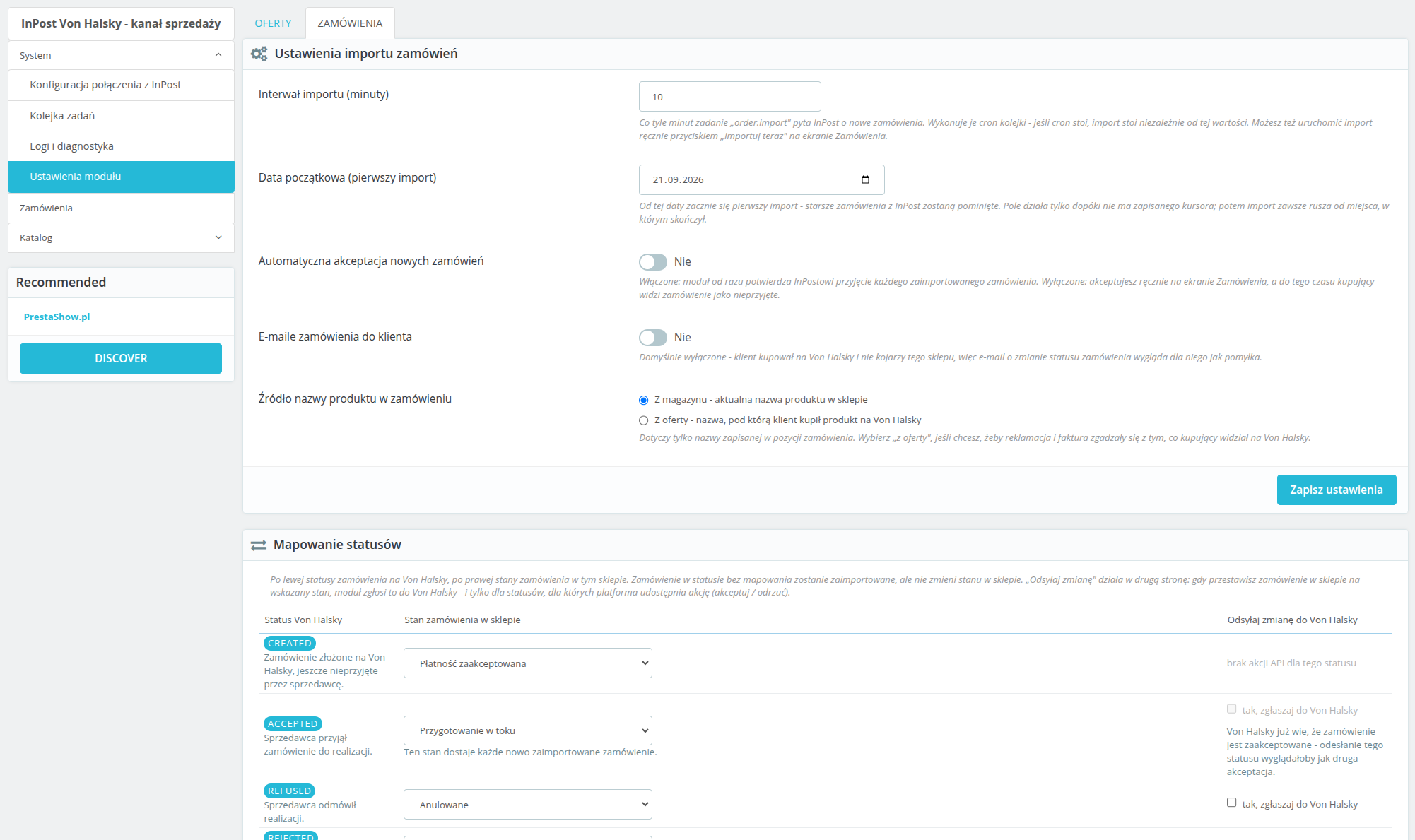
Import uruchamia się według harmonogramu lub ręcznie. Moduł pozwala ustawić automatyczną akceptację zamówień. Statusy InPost przypisujesz do statusów sklepu; odsyłanie zmian obejmuje akcje udostępnione przez API, m.in. akceptację i odrzucenie. Brak przypisanego przewoźnika powoduje czytelny błąd importu. Panel pokazuje stan połączenia, działanie CRON i postęp kolejki. „Logi i diagnostyka” pomagają znaleźć przyczynę błędu API. Historię wyeksportujesz do CSV na potrzeby wsparcia. Tak. Konfiguracja, oferty i zamówienia są oddzielne dla każdego sklepu. Moduł szyfruje dane dostępowe i tokeny, korzysta z OAuth2 z PKCE oraz obsługuje eksport i usuwanie danych klienta. Okresy retencji ograniczają przechowywanie danych zamówień i logów. Panel jest w języku polskim.InPost Von Halsky - najczęstsze pytania
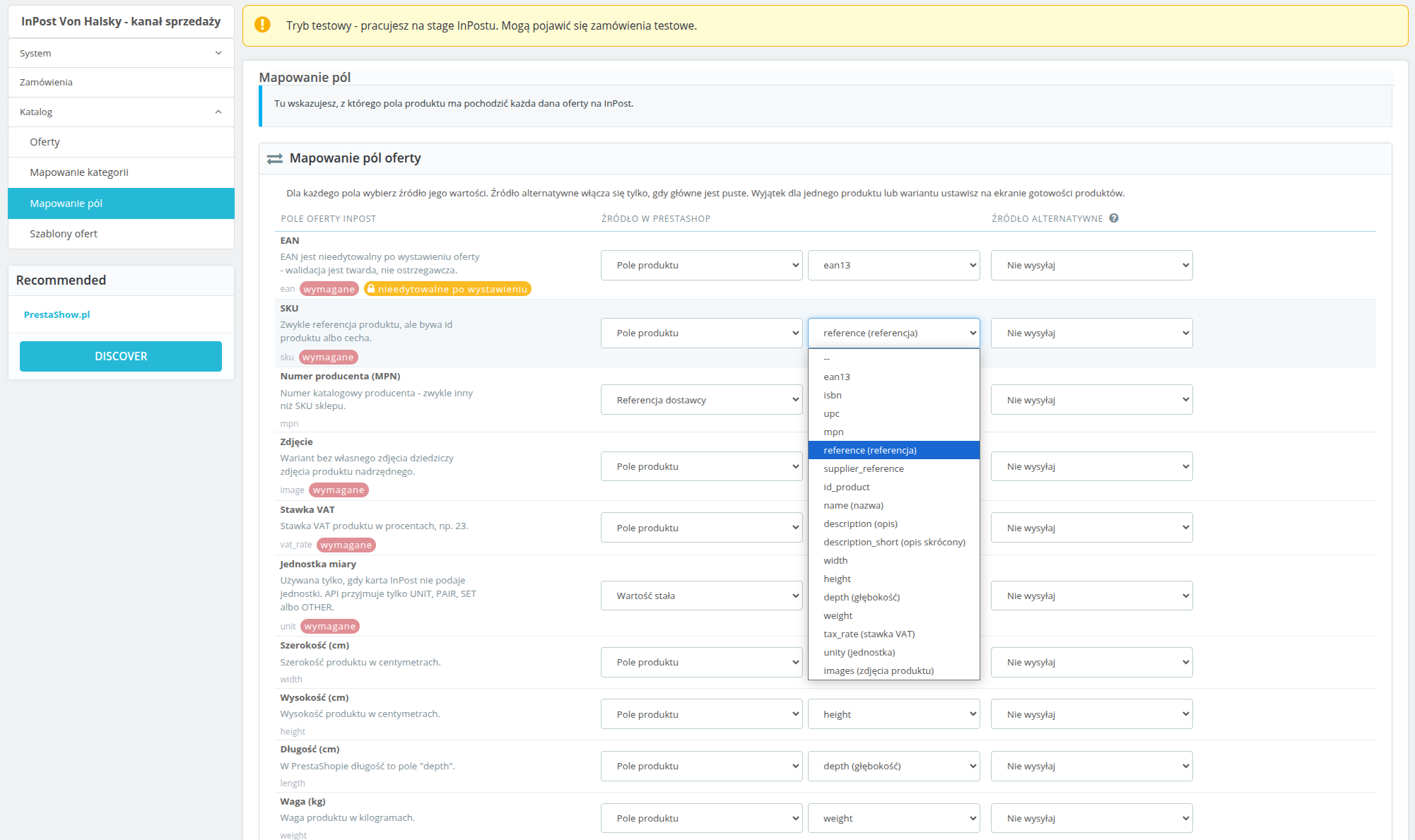
Jak dopasuję dane ofert, w tym pola GPSR?
Jak działają statusy i import zamówień?
Gdzie sprawdzę połączenie i automatyczne zadania?
Czy moduł obsługuje multistore i ochronę danych?
Changelog (v1.0)
## 1.0.0 - 2026-09-14
First real changelog entry for this module, reconstructed from `git log` and from
`TEST-REPORT.md`'s fix rounds, since the placeholder that shipped before this covered none of the
actual work. No `v1.0.0` tag has been cut yet.
### Added
* OAuth2 connection to InPost (Authorization Code + PKCE), with a back-office screen showing
connection health broken down into credentials, token, organization and token scope, each
checked live against the API rather than cached.
* Category mapping between PrestaShop and Von Halsky categories, including recursive mapping and
the category attribute tree pulled live from the API.
* Listing templates: title patterns, description source, price markup/discount, shipping days and
unit, with support for multiple templates and one required default.
* Offer publishing, both single-product (inline) and bulk (queued), with a readiness screen that
checks every product against InPost's requirements before publish is even offered.
* Price and stock synchronisation, on a configurable schedule and on demand, plus a minimum-stock
threshold that closes an offer instead of sending a low stock count.
* Offer close, reopen and unlink actions.
* Order import from the marketplace event stream, with manual product matching when an order line
can't be resolved automatically, and an "Importuj teraz" manual trigger.
* Status mapping and carrier mapping (parcel locker / courier) for order import, plus outbound
status pushes (accept/refuse) back to the platform when a PrestaShop order reaches a configured
state.
* The module's own async job queue and the `cron.php` entry point that drives it, including a
recurring category-data refresh job with a per-caller time budget.
* A diagnostics screen (health check tiles, API error log, CSV export) and a log/audit trail of
every API call and response.
* A first product published end to end against InPost stage, and the category mapping fixes that
made that possible.
### Changed
* Orders now materialise in PrestaShop only once the marketplace order reaches `ACCEPTED`, rather
than earlier in its lifecycle.
* Marketplace order confirmation mail is suppressed at the mail layer by default, since the buyer
address on these orders is a pseudonymous InPost relay address, not a real mailbox.
* Price and stock are recorded as synced only once the platform confirms the change, not as soon as
this module sends it - the two "sent" columns on the offers screen reflect what InPost actually
knows, not what was last transmitted.
* OAuth client secret and access/refresh tokens are encrypted at rest instead of stored in plain
text.
* The cron token is read from a request header first (`X-VH-Cron-Token` / `X-VH-Cron-Shop`) and
stripped from `$_GET`/`$_POST`/`$_REQUEST` before PrestaShop's own bootstrap runs, so it no
longer leaks into a redirect `Location` header and from there into access and proxy logs. The old
query-string form still works as a fallback.
* `ps_versions_compliancy.min` raised from `1.7` to `1.7.7` - the code already relies on the `mpn`
columns and `hookDisplayAdminOrderMain`, neither of which exists before 1.7.7, so the
declared floor now matches what the module actually needs. Part of a wider compatibility campaign
checking PHP 7.1-8.4 and PS 1.7.7-9.0; see `COMPAT-CAMPAIGN.md`.
### Fixed
* On PrestaShop 1.7.7 the `orders.note` column does not exist yet (it arrived in 1.7.8), so the
marketplace order comment was assigned to a property that was never saved. The write is now
guarded by the `Order` definition, so 1.7.8+ keeps the comment and 1.7.7 skips it instead of
silently losing it (found by the compatibility campaign, cell a).
* On PrestaShop 1.7.7 re-applying the same order state fires `actionOrderStatusPostUpdate` again
and queued a second `order.push_status` job for the same target status. The synchronizer now
checks for a pending or reserved push of that status before queueing (cell a, integration test
F18).
* Log CSV export passed no `$escape` argument to `fputcsv()`, which PHP 8.4 reports as deprecated
on every exported row (cell h). The argument is now explicit.
* A GPSR manufacturer phone number that wasn't already in E.164 format (the normal case, since the
back office's own fix-it form accepted anything) caused InPost to reject the entire offer. Phone
numbers are now normalised before sending, or omitted if they can't be, and the readiness check
flags a bad value before publish is attempted.
* InPost's field-level validation detail was parsed out of API error responses but never actually
shown anywhere - the back office and the stored error message both said only "Validation failed"
with no indication which field. The field and reason are now included in both places.
* An offer whose EAN was edited after listing was sent to the platform anyway and rejected outright
("Once assigned field cannot be changed"). Changed immutable fields are now dropped from the
outgoing update instead of being sent.
* An offer name, brand, SKU or attribute value longer than InPost's limit was silently truncated
with no warning; an EAN over its limit threw a plain exception that escaped the job handler as an
uncaught fatal instead of failing the offer cleanly. Both now surface as proper validation
warnings/errors before publish.
* Product images served from a URL InPost's fetcher couldn't reach caused every offer for that
product to be rejected with no visible reason in the back office. Image reachability is now
checked as part of readiness validation, bounded so a bad image host can't turn a bulk readiness
sweep into a multi-minute hang.
* An offer rejected by the platform after publish was only ever noticed if an event happened to
arrive for it; one that fell outside the event window could sit "W trakcie wystawiania"
indefinitely with no error shown anywhere. Offers stuck in that state for more than 20 minutes are
now re-checked directly.
* A cron job configured with a typo'd shop id received a silent redirect to the storefront instead
of an error, making a broken cron schedule look like it was working.
* Order import ran on a schedule from the moment the module was installed, even though status and
carrier mapping start out empty and nothing warned that orders couldn't be imported correctly
until the first real order failed to build. The diagnostics screen and the order list now warn
while either mapping is incomplete.
* The diagnostics/log screen scrolled the entire page sideways on narrower viewports instead of
scrolling just the log table, the way every other wide table in the module already did.
* Internal ticket references (`VH-09`, `VH-10`) were visible in order-settings headings shown to
shop operators; removed.
First real changelog entry for this module, reconstructed from `git log` and from
`TEST-REPORT.md`'s fix rounds, since the placeholder that shipped before this covered none of the
actual work. No `v1.0.0` tag has been cut yet.
### Added
* OAuth2 connection to InPost (Authorization Code + PKCE), with a back-office screen showing
connection health broken down into credentials, token, organization and token scope, each
checked live against the API rather than cached.
* Category mapping between PrestaShop and Von Halsky categories, including recursive mapping and
the category attribute tree pulled live from the API.
* Listing templates: title patterns, description source, price markup/discount, shipping days and
unit, with support for multiple templates and one required default.
* Offer publishing, both single-product (inline) and bulk (queued), with a readiness screen that
checks every product against InPost's requirements before publish is even offered.
* Price and stock synchronisation, on a configurable schedule and on demand, plus a minimum-stock
threshold that closes an offer instead of sending a low stock count.
* Offer close, reopen and unlink actions.
* Order import from the marketplace event stream, with manual product matching when an order line
can't be resolved automatically, and an "Importuj teraz" manual trigger.
* Status mapping and carrier mapping (parcel locker / courier) for order import, plus outbound
status pushes (accept/refuse) back to the platform when a PrestaShop order reaches a configured
state.
* The module's own async job queue and the `cron.php` entry point that drives it, including a
recurring category-data refresh job with a per-caller time budget.
* A diagnostics screen (health check tiles, API error log, CSV export) and a log/audit trail of
every API call and response.
* A first product published end to end against InPost stage, and the category mapping fixes that
made that possible.
### Changed
* Orders now materialise in PrestaShop only once the marketplace order reaches `ACCEPTED`, rather
than earlier in its lifecycle.
* Marketplace order confirmation mail is suppressed at the mail layer by default, since the buyer
address on these orders is a pseudonymous InPost relay address, not a real mailbox.
* Price and stock are recorded as synced only once the platform confirms the change, not as soon as
this module sends it - the two "sent" columns on the offers screen reflect what InPost actually
knows, not what was last transmitted.
* OAuth client secret and access/refresh tokens are encrypted at rest instead of stored in plain
text.
* The cron token is read from a request header first (`X-VH-Cron-Token` / `X-VH-Cron-Shop`) and
stripped from `$_GET`/`$_POST`/`$_REQUEST` before PrestaShop's own bootstrap runs, so it no
longer leaks into a redirect `Location` header and from there into access and proxy logs. The old
query-string form still works as a fallback.
* `ps_versions_compliancy.min` raised from `1.7` to `1.7.7` - the code already relies on the `mpn`
columns and `hookDisplayAdminOrderMain`, neither of which exists before 1.7.7, so the
declared floor now matches what the module actually needs. Part of a wider compatibility campaign
checking PHP 7.1-8.4 and PS 1.7.7-9.0; see `COMPAT-CAMPAIGN.md`.
### Fixed
* On PrestaShop 1.7.7 the `orders.note` column does not exist yet (it arrived in 1.7.8), so the
marketplace order comment was assigned to a property that was never saved. The write is now
guarded by the `Order` definition, so 1.7.8+ keeps the comment and 1.7.7 skips it instead of
silently losing it (found by the compatibility campaign, cell a).
* On PrestaShop 1.7.7 re-applying the same order state fires `actionOrderStatusPostUpdate` again
and queued a second `order.push_status` job for the same target status. The synchronizer now
checks for a pending or reserved push of that status before queueing (cell a, integration test
F18).
* Log CSV export passed no `$escape` argument to `fputcsv()`, which PHP 8.4 reports as deprecated
on every exported row (cell h). The argument is now explicit.
* A GPSR manufacturer phone number that wasn't already in E.164 format (the normal case, since the
back office's own fix-it form accepted anything) caused InPost to reject the entire offer. Phone
numbers are now normalised before sending, or omitted if they can't be, and the readiness check
flags a bad value before publish is attempted.
* InPost's field-level validation detail was parsed out of API error responses but never actually
shown anywhere - the back office and the stored error message both said only "Validation failed"
with no indication which field. The field and reason are now included in both places.
* An offer whose EAN was edited after listing was sent to the platform anyway and rejected outright
("Once assigned field cannot be changed"). Changed immutable fields are now dropped from the
outgoing update instead of being sent.
* An offer name, brand, SKU or attribute value longer than InPost's limit was silently truncated
with no warning; an EAN over its limit threw a plain exception that escaped the job handler as an
uncaught fatal instead of failing the offer cleanly. Both now surface as proper validation
warnings/errors before publish.
* Product images served from a URL InPost's fetcher couldn't reach caused every offer for that
product to be rejected with no visible reason in the back office. Image reachability is now
checked as part of readiness validation, bounded so a bad image host can't turn a bulk readiness
sweep into a multi-minute hang.
* An offer rejected by the platform after publish was only ever noticed if an event happened to
arrive for it; one that fell outside the event window could sit "W trakcie wystawiania"
indefinitely with no error shown anywhere. Offers stuck in that state for more than 20 minutes are
now re-checked directly.
* A cron job configured with a typo'd shop id received a silent redirect to the storefront instead
of an error, making a broken cron schedule look like it was working.
* Order import ran on a schedule from the moment the module was installed, even though status and
carrier mapping start out empty and nothing warned that orders couldn't be imported correctly
until the first real order failed to build. The diagnostics screen and the order list now warn
while either mapping is incomplete.
* The diagnostics/log screen scrolled the entire page sideways on narrower viewports instead of
scrolling just the log table, the way every other wide table in the module already did.
* Internal ticket references (`VH-09`, `VH-10`) were visible in order-settings headings shown to
shop operators; removed.
Wymagania techniczne
Wymagania techniczne
- PHP 7.1 - 8.x
- Rozszerzenie serwera ionCube Loader
Wsparcie i aktualizacje
Wsparcie = Aktualizacje + HelpDesk
Otrzymujesz 90 dni (3 miesiące) dostępu do kompletnego pakietu wsparcia PrestaShow.
Aktualizacje modułów
Moduły poinformują Cię o dostępnych aktualizacjach. Zapoznaj się z listą zmian (changelog) i wykonaj aktualizację modułu 1-kliknięciem bezpośrednio w Twoim sklepie.
Panel HelpDesk
To panel, w którym dostarczymy Ci pomoc. Na HelpDesk możesz zgłaszać problemy, zamówić darmową instalację i aktualizację modułu oraz zamawiać modyfikacje i indywidualne prace programistyczne.
> > > Wydłuż wsparcie
Po wygaśnięciu wsparcia możesz korzystać z modułu bez żadnych ograniczeń. Dostęp do wsparcia możesz odnowić w dowolnym momencie, gdy będziesz tego potrzebował.
Baza Wiedzy & FAQ
Za darmo na zawsze
Baza wiedzy
Jest dostępna dla wszystkich. Znajdziesz w niej dokumentacje modułów oraz instrukcje, filmy i odpowiedzi na najczęściej zadawane pytania.
Licencja
Dożywotnia licencja na moduł
- Moduł możesz używać bez ograniczeń w 1 sklepie = 1 domena.
- Możesz używać dodatkowej domeny, np. dla kopi developerskiej.
- Za niewielką opłatą możesz samodzielnie zmienić domenę dla modułu.
Dodatkowe domeny dla Multistore
- Wszystkie nasze moduły obsługują PrestaShop Multistore.
- Obsługa nielimitowanej liczby domen dla PrestaShop Multistore wymaga zakupienia obsługi multistore dla modułu.
Modyfikowanie kodu
- Kod modułu związany z integracją ze sklepem oraz z wyglądem (.tpl, .css, .js) ma otwarty kod źródłowy i możesz go dowolnie modyfikować.
- Kod źródłowy modułu (.php) szyfrowany jest ionCube, a jego modyfikacja wiąże się z utratą gwarancji.
Brak powiązanych wpisów blogowych.
Brak komentarzy.